
Headlights/Position Lights
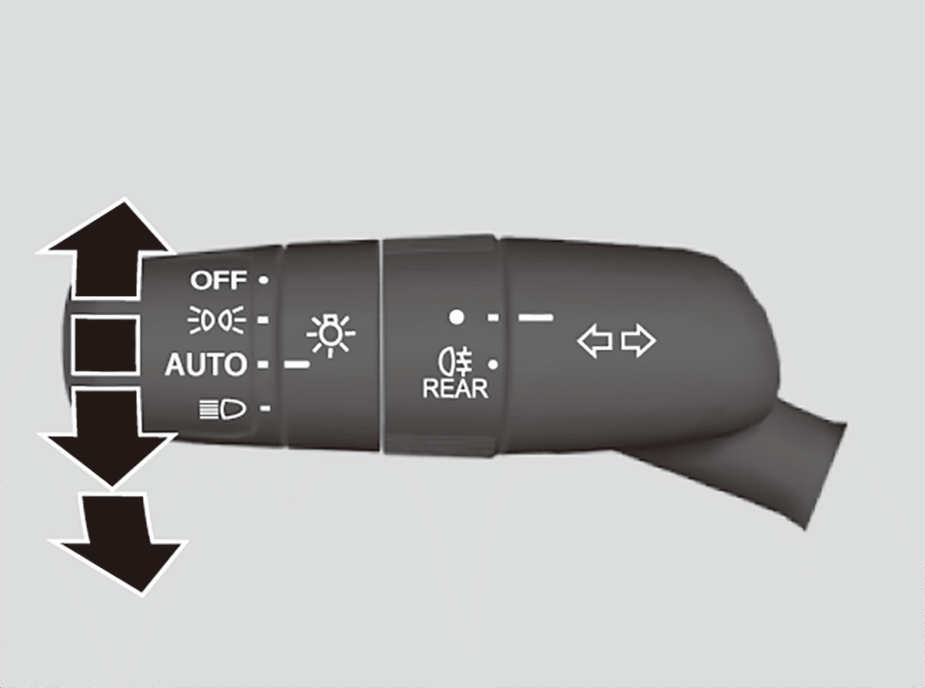
The lights will turn on automatically depending on the ambient brightness.
They can also be switched on and off manually.
- The
 lights on indicator in the instrument panel will turn on.
The exterior lights will switch on automatically when the light switch is set to AUTO while the power mode is in ON.
Manual Operation
Headlights/position lights:
Turn the light switch to .
.
Position lights:
Turn the light switch to until the position lights come on, then release.
Headlight/position lights off:
While the shift position is in P and the parking brake is applied, turn the light switch to OFF and then release once the lights turn off.
- The lights will come back on automatically when:
- The light switch is turned to OFF again and released.
- The shift position is changed out of P and the parking brake is released.
When the position lights are on, the rear side marker, tail, and rear licence plate lights will also switch on.
The headlights are suitable for left hand drive and right hand drive, without the need to make any adjustments or masking, as per UN-Regulation No.48 Dover Regulation.
The light sensor is in the location shown below.
Do not cover the light sensor.
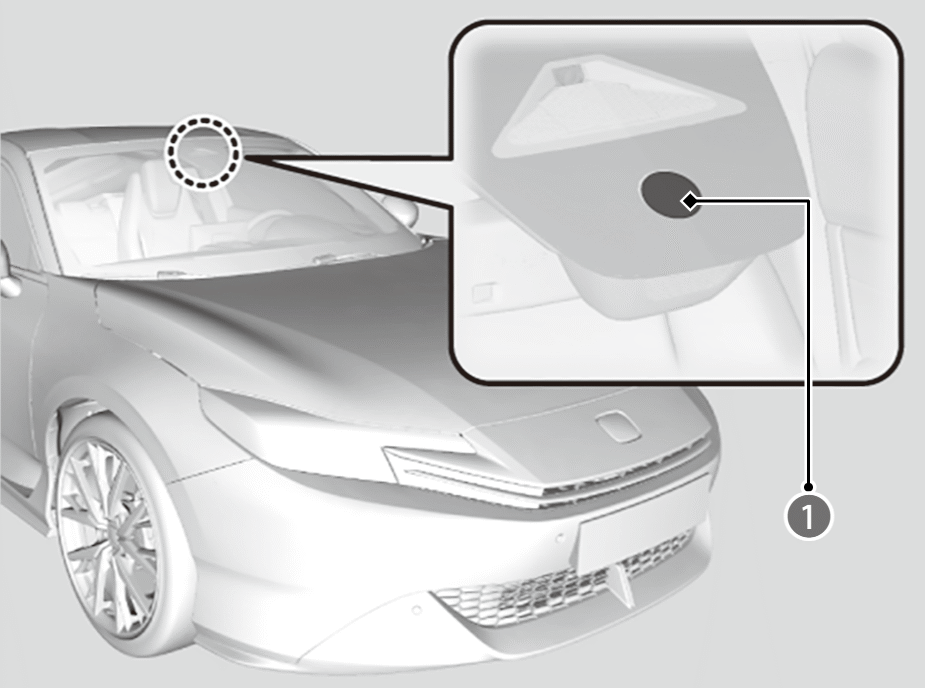

Light Sensor

 or
or and the power is turned to OFF, a beeper sounds when the driver’s door is opened.
Your vehicle is equipped with the automatic headlight adjusting system that automatically adjusts the vertical angle of the low beam headlights. If you find a significant change in the vertical angle of the headlights, there may be a problem with the system. Have your vehicle checked by a dealer.
High Beams
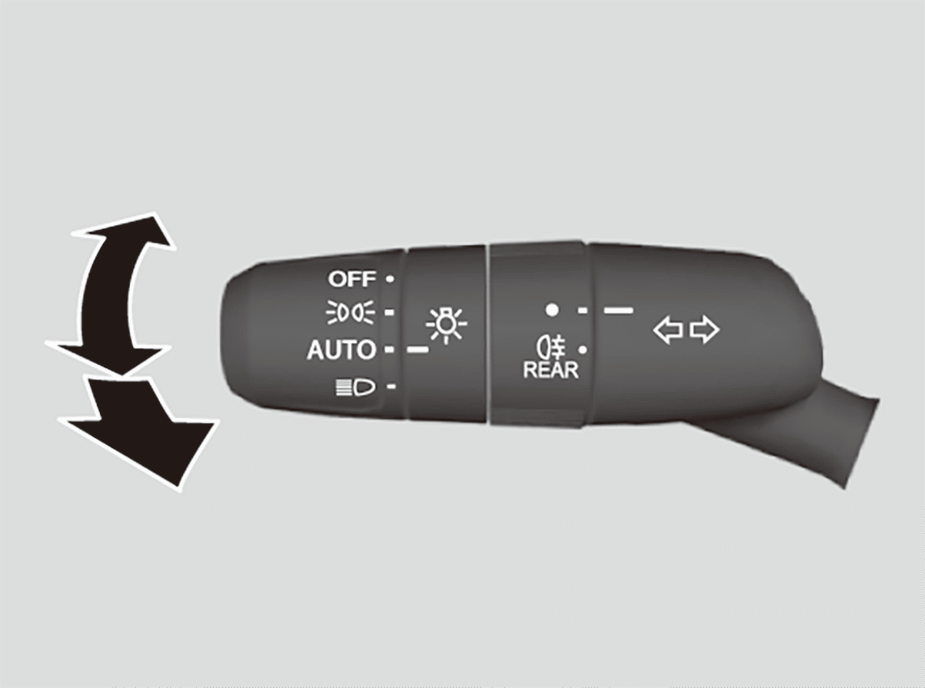
When the headlights are on, push the lever forward.
Pull the lever back to return to low beams.
The high beam indicator in the instrument panel will turn on when the high beams are on.
- Flashing the high beams: Pull the lever back, and release it.
Headlight Integration with Wipers
The headlights automatically come on when the wipers are used several times within a certain number of intervals with the headlight switch in AUTO.
The headlights automatically go off a few minutes later if the wipers are stopped.
This feature activates while the headlights are off in AUTO.
The instrument panel brightness does not change when the headlights come on.
At dark ambient light levels, the automatic lighting control feature turns on the headlights, regardless of the number of wiper sweeps.

You can turn the headlight integration with wipers function on and off.
Automatic Lighting Off Feature
The headlights, all other exterior lights, and the instrument panel lights turn off 15 seconds after you set the power mode to VEHICLE OFF, take the keyless remote with you, and close the driver’s door.
However, when the switch is in, the position lights remain on.
If you set the power mode to VEHICLE OFF with the headlight switch on, but do not open the door, the lights turn off after 10 minutes (3 minutes, if the switch is in the AUTO position).
The lights turn on again when you unlock or open the driver’s door.
If you unlock the door, but do not open it within 15 seconds, the lights go off.
If you open the driver’s door, you will hear a reminder chime alerting you that the lights are on.
You can change the headlight auto off timer setting.
Rear Fog Light
Can be used when the headlights are on.
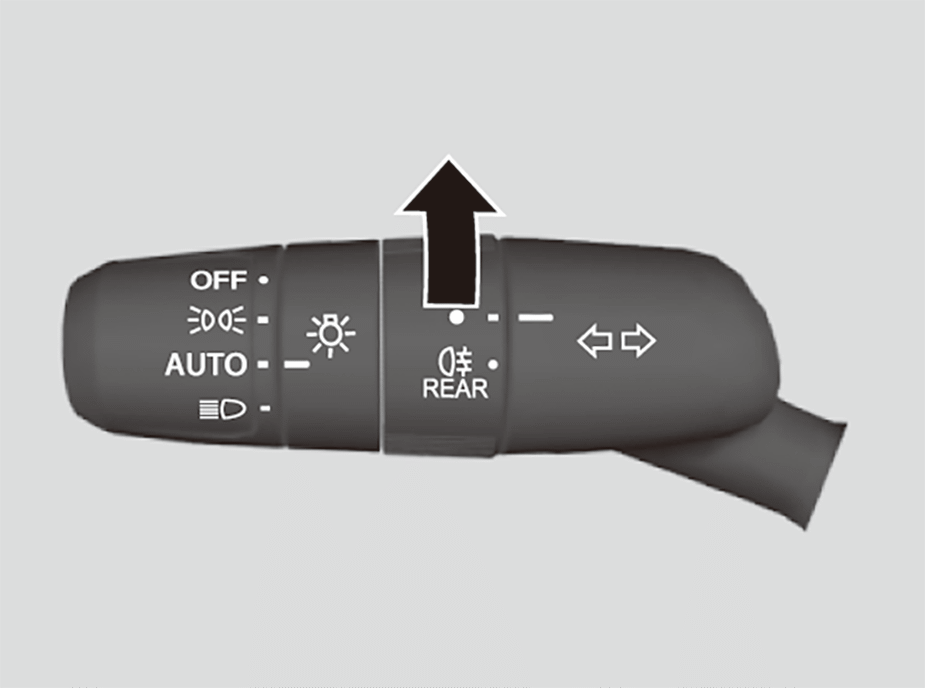
To turn the rear fog light on
Rotate the switch to .
.
Theindicator comes on.
Active Cornering Lights
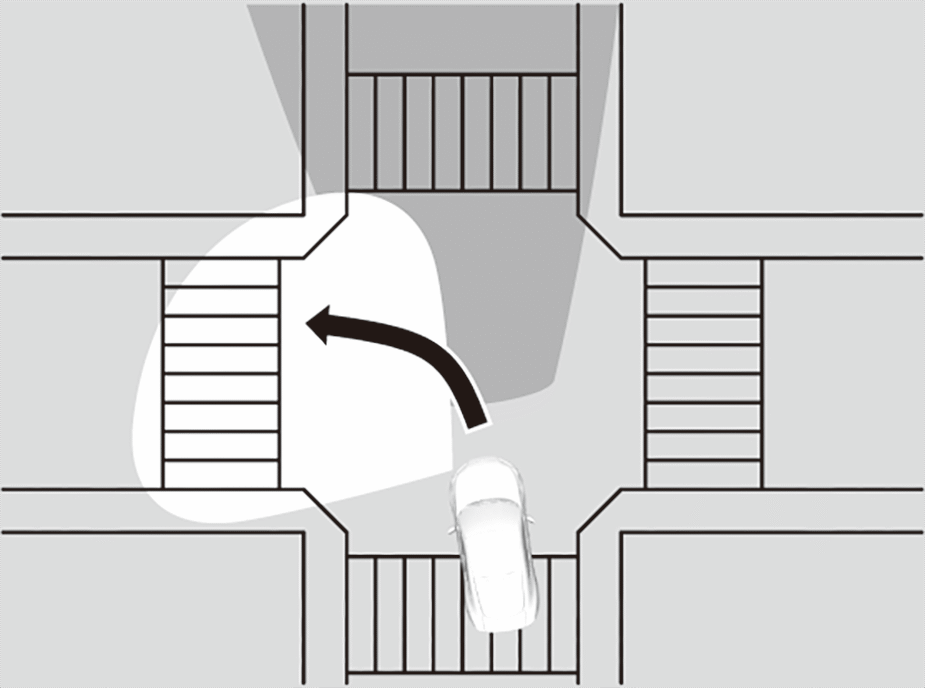
Enhance the visibility of the corner(s) when making a turn. With the power mode in ON, the headlights on, and the vehicle speed at less than 36 km/h (22 mph), the cornering light(s) comes on either when operating the turn signals or the steering wheel, or putting the transmission in R.
- You move the transmission into R.
- The active cornering lights go off automatically after five minutes. To resume the lights on, recreate the same condition; putting the turn signal lever or steering wheel in the centre position, then operate it again, or if the transmission has been in R, move it to another position momentarily.
Daytime Running Lights
The daytime running lights comes on when the following conditions have been met:
- The power mode is in ON.
- The headlight switch is in AUTO or.
- The ambient light is bright.
To turn off the daytime running lights, turn the light switch to OFF while the vehicle is stopped, and then release once the lights turn off. When the transmission is changed out of P and the parking brake is released, the lights will come on again. Otherwise, if the light switch is once more turned to OFF, the lights will come on again.
The tail lights will also come on when the daytime running lights are on.
Adaptive Driving Beam
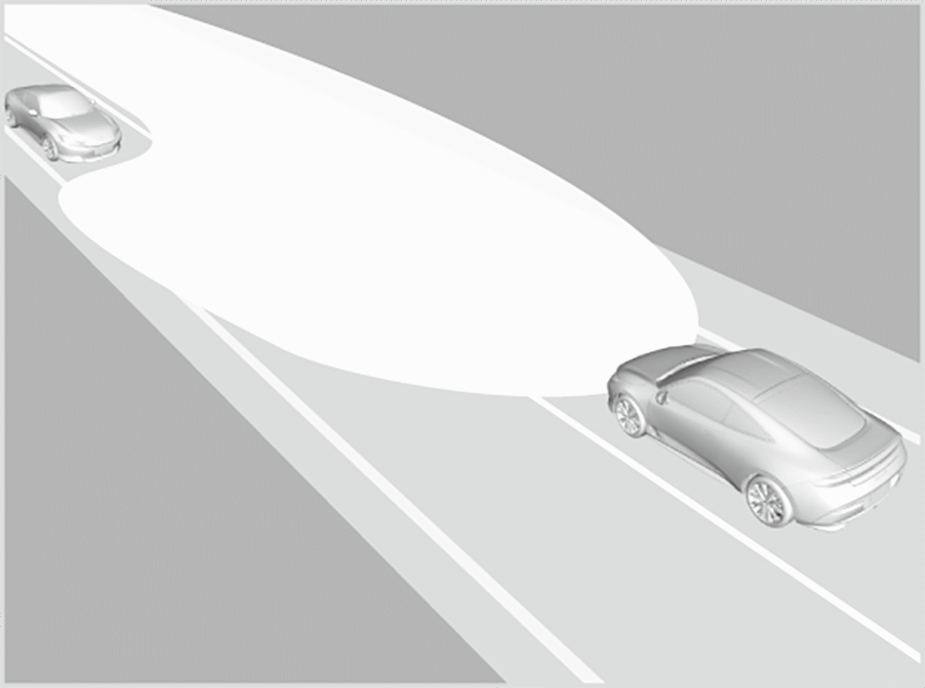
When driving at night, the front wide view camera detects light sources such as street lights or the lights of an oncoming or preceding vehicle. The system automatically switches the headlights between low and high beam depending on the situation. In addition, the system automatically adjusts the light distribution of the high beams in order to reduce glare for preceding and oncoming vehicles.
The system also increases the coverage of the low beams when the low beams are on and the vehicle speed is 40 km/h (25 mph) or less, improving visibility to the left and right.
How to use the adaptive driving beam
Activating the system
The adaptive driving beam indicator comes on, and the system begins adjusting the light distribution of the high beams when all of the following conditions are met.
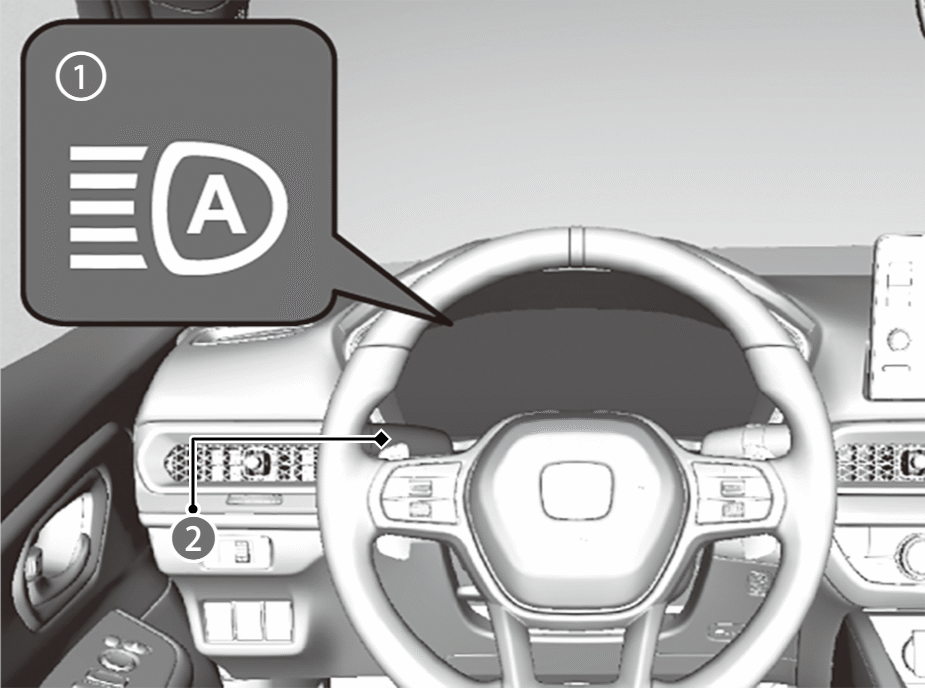
Adaptive Driving Beam Indicator

Light Switch
- The power mode is in ON.
- The light switch is in AUTO.
- The lever is in the low beam position.
- The headlights have been automatically activated
- It is dark outside the vehicle.
If the adaptive driving beam indicator does not come on even when all the conditions have been met, carry out either of the procedures below and the indicator will come on.
- Pull the lever towards you and release it.
- Turn the light switch to
 then turn the light switch to AUTO.
The adaptive driving beam system does not always operate in every situation. This system is just for assisting the driver. Always observe your surroundings and manually switch the headlights between high beam and low beam if necessary.
The range and the distance at which the camera can recognise light sources varies depending on conditions surrounding your vehicle.
Regarding the handling of the camera mounted to the inside of the windscreen, refer to the following.
For the adaptive driving beam to work properly:
- Do not place an object that reflects light on the dashboard.
- Keep the windscreen around the camera clean.
- When cleaning the windscreen, be careful not to apply the windscreen cleanser to the camera lens.
- Do not attach an object, sticker, or film to the area around the camera.
- Do not touch the camera lens.
- If the camera receives a strong impact, or repairing of the area near the camera is required, consult a dealer.
How to turn off the Adaptive Driving Beam System: You can turn the adaptive driving beam system on and off.
In the following cases, the adaptive driving beam system may not switch the headlights properly or the switching timing may be changed. If the automatic switching operation does not fit for your driving habits, please switch the headlights manually.
- The brightness of the lights from a preceding or oncoming vehicle is intense or poor.
- Visibility is poor due to the weather (rain, snow, fog, windscreen frost, etc.).
- Surrounding light sources like street lights, electric billboards, and traffic lights are illuminating the road ahead.
- The brightness level of the road ahead constantly changes.
- The road is bumpy or has many curves.
- A vehicle suddenly appears in front of you, or a vehicle in front of you is not in the preceding or oncoming direction.
- Your vehicle is tilted with a heavy load in the rear.
- A traffic sign, mirror, or other reflective object ahead is reflecting strong light towards the vehicle.
- The oncoming vehicle frequently disappears under roadside trees or behind median barriers.
- The preceding or oncoming vehicle is a motorcycle, bicycle, mobility scooter, or other small vehicle.
The adaptive driving beam system keeps the headlight low beam when:
- Windscreen wipers are operating at a high speed.
- The camera has detected a dense fog.
Automatically adjusting the light distribution
The system starts to automatically adjust the light distribution of the high beams once the vehicle speed is 40 km/h (25 mph) or higher, and the light distribution changes depending on vehicle speed, or under the following conditions:
- There is a preceding or oncoming vehicle with headlights or taillights turned on.
- There are many street lights on the road ahead.
If the vehicle speed slows to 24 km/h (15 mph) or lower, the system stops automatically adjusting the light distribution and switches the headlights to low beam.
Manual switching between high-beam and low-beam
If you want to manually switch the headlights between high beam and low beam, follow either of the procedures below. Note that when you do this, the adaptive driving beam indicator will turn off and the adaptive driving beam will be deactivated.
Using the lever:
Pull the lever towards you for flashing the high beams then release it.
- To reactivate the adaptive driving beam, follow either of the procedures below and the adaptive driving beam indicator will come on.
- Pull the lever towards you and release it.
- Turn the light switch toand then to AUTO when the lever is in the low beam position.
Using the light switch:
Turn the light switch to.
- To reactivate the adaptive driving beam, turn the light switch to AUTO when the lever is in the low beam position, and the adaptive driving beam indicator will come on.