
Front Wide View Camera
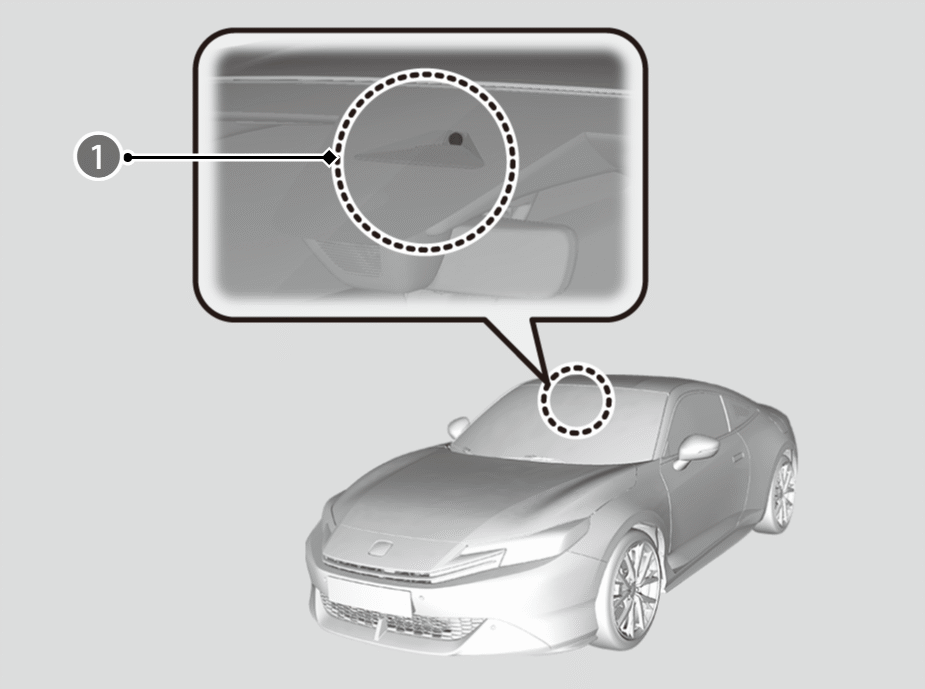
This camera ( ) is located behind the rearview mirror.
Handling of the Camera
- Avoid high interior temperatures to prevent the camera’s sensing system from shutting off.
- It is recommended to find a shady area or face the front of the vehicle away from the sun when parking.
- To avoid concentrating heat on the camera, do not cover the camera when using a reflective sun shade.
- Never apply a film or attach any objects to the windscreen, the bonnet, or the front grille that could obstruct the camera’s field of vision and cause the system to operate abnormally.
- Do not scratch, nick, or cause any other damage to the windscreen.
- Damage within the camera’s field of vision can cause the system to operate abnormally. If this occurs, we recommend that you replace the windscreen with a genuine Honda replacement windscreen.
- After replacing the windscreen, have a dealer recalibrate the camera. Proper calibration of the camera is necessary for the system to operate properly.
- Making even minor repairs within the camera’s field of vision or installing an aftermarket replacement windscreen may also cause the system to operate abnormally.
- Do not place an object on the top of the instrument panel.
- It may reflect onto the windscreen and prevent the system from detecting lane lines properly.
- Do not install anything on the bonnet or front grille that obstructs the camera’s view.
If the Some driver assist systems cannot operate: Camera temperature too high message appears:
- Use the climate control system to cool down the interior and, if necessary, also use demister mode with the airflow directed towards the camera.
- Start driving the vehicle to lower the windscreen temperature, which cools down the area around the camera.
If the Some driver assist system cannot operate: Clean front windscreen or poor viewing condition. message appears:
- Park your vehicle in a safe place, and make sure the windscreen is clean. Clean the windscreen if it is dirty.
- It may also appear in bad weather such as rain, fog, or snow, or when camera visibility is poor such as at night, in a tunnel, at dawn, or at dusk when the ambient conditions are dark.

If the message does not disappear after the vehicle has been driven for a while, have your vehicle checked by a dealer.