
Deceleration Paddle Selector
You can use the paddles on the steering wheel to change the rate of deceleration (between six stages) when you release the accelerator pedal. When descending a hill, you can use the deceleration paddle selector to help maintain the rate of deceleration, thereby allowing you to keep a safe distance between your vehicle and the vehicle ahead.
This feature can be used if the drive mode is set to NORMAL or ECON mode.
 WARNING
Increasing the deceleration rate by quickly shifting the deceleration paddle selector can cause the tyres to skid, resulting in a crash that could injure or kill someone.
Always maintain a reasonable rate of deceleration.
How to Operate the Deceleration Paddle Selector
Each paddle operation changes the deceleration level by 1.
- The deceleration rate only changes by one level even if you keep the paddle pulled back.
- If you pull back the right and left paddle selector at the same time, the deceleration level may not change.
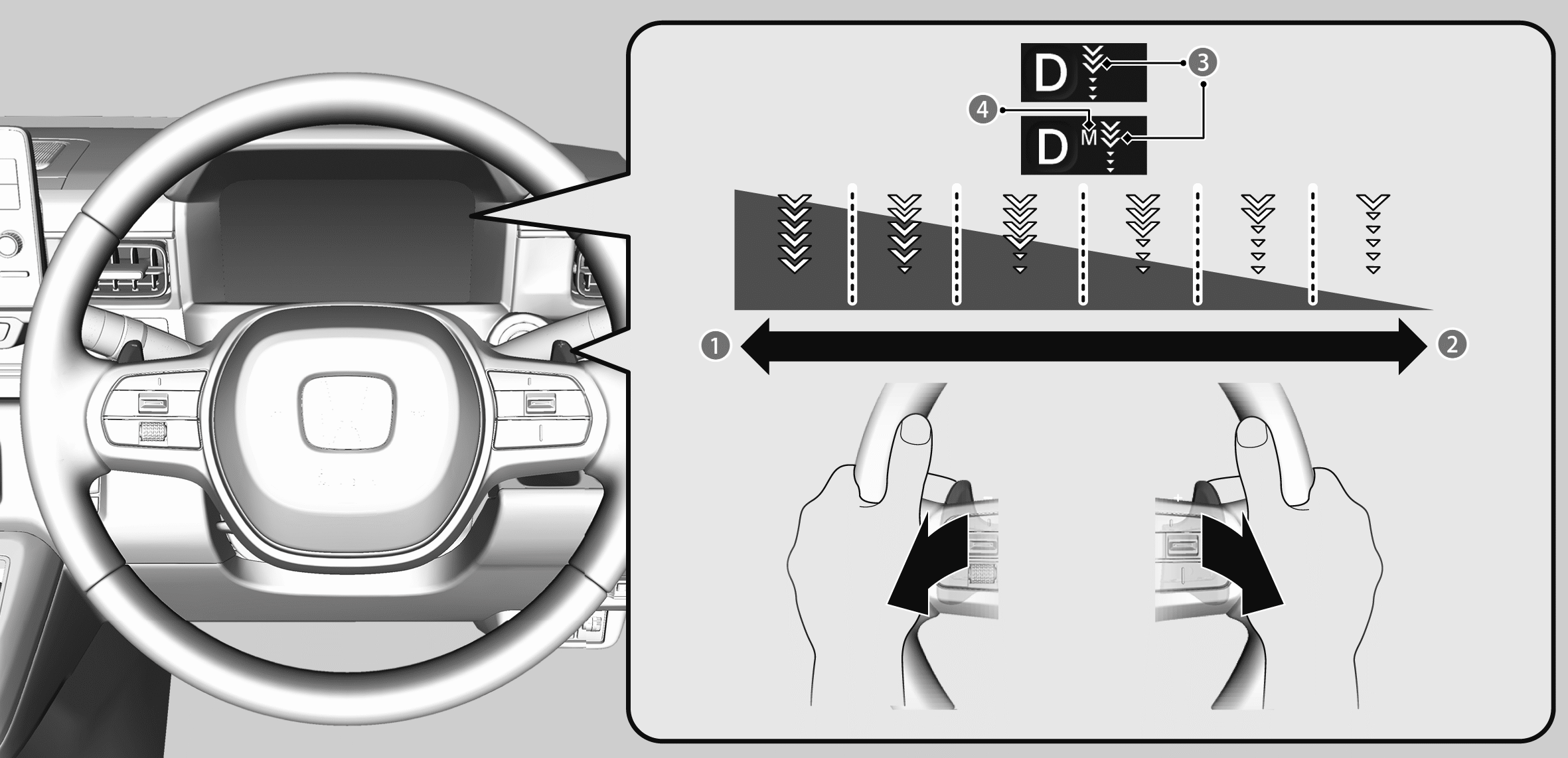

Pull back on the − paddle (left side)
- Rate of deceleration increases.

Pull back on the + paddle (right side)
- Rate of deceleration decreases.

Deceleration Paddle Selector Indicator: Shows the rate of deceleration.

M display: Appears when the rate of deceleration is fixed.
Using the deceleration paddle selector
The deceleration paddle selector indicator comes on when you pull back on the paddle while the shift position is in D.
- If you pull back on the − paddle, the rate of deceleration is set to level 3.
- If you pull back on the + paddle, the rate of deceleration is set to level 1.
When you decelerate to a full stop or press down on the accelerator, the deceleration paddle selector is automatically cancelled, and the deceleration paddle selector indicator goes off.
Using the paddle selector with a fixed rate of deceleration
If you keep the − paddle pulled back, the M display and the deceleration paddle selector indicator appear, and you can use the deceleration paddle selector with a fixed setting.
To unlock the fixed deceleration paddle selector, pull and hold back the + paddle.
Deceleration Paddle Selector Limitations
In the following situations, the display will blink and the rate of deceleration will not change even if you pull back on the paddle.
Additionally, the number of selectable deceleration levels may be reduced, the rate of deceleration may automatically decrease, and this function may be cancelled.
- Power system protection is needed.
- The vehicle accelerates/decelerates repeatedly.
- The vehicle is on a long downward slope.
- When driving for a long time with a heavy load.
- When the brake system indicator (amber) comes on.