
Deceleration Paddle Selector
You can use the paddles on the handle to change the rate of deceleration, from level 0 to level 6 or 7, when you release the accelerator pedal. When descending a hill, you can use the deceleration paddle selector to help maintain the rate of deceleration, thereby allowing you to keep a safe distance between your vehicle and the vehicle ahead.
 WARNING
Rapidly increasing the deceleration rate by quickly shifting the deceleration paddle selector can cause the tyres to skid, resulting in a crash that could injure or kill someone.
Always maintain a reasonable rate of deceleration.
How to Operate the Deceleration Paddle Selector
Each paddle operation changes the deceleration level by 1.
- The deceleration rate only changes by one level even if you keep the paddle pulled back.
- If you pull back the right and left paddle selector at the same time, the deceleration level may not change.
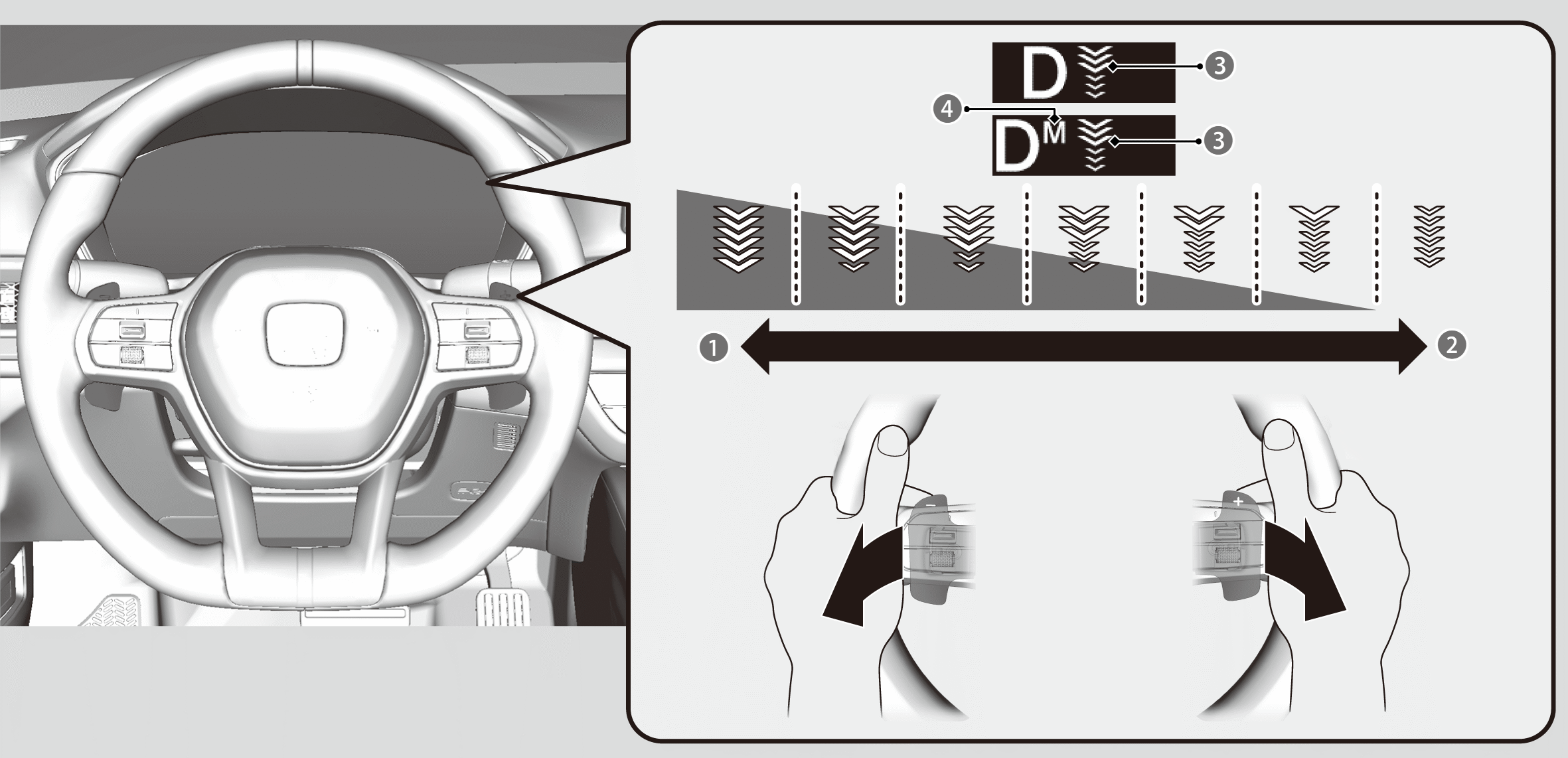

Pull back on the − paddle (left side)
- Rate of deceleration increases.

Pull back on the + paddle (right side)
- Rate of deceleration decreases.

Deceleration Paddle Selector Indicator: Shows the rate of deceleration.

M display: Appears when the rate of deceleration is fixed.
Using the deceleration paddle selector
The deceleration rate display comes on when you pull back on the paddle while the transmission is in D.
The first time you pull back on the − paddle, the rate of deceleration is set to level 3.
The first time you pull back on the + paddle, the rate of deceleration is set to level 0.
When you decelerate to a full stop or press down on the accelerator, the deceleration rate selector is automatically cancelled, and the deceleration rate display goes off.
If you pull back on the − paddle while in stage 0, the rate of deceleration increases to stage 2.
Using the paddle selector with a fixed rate of deceleration
If you keep the paddle selector pulled back while the transmission is in D, the M display and deceleration rate display appear, and you can use the deceleration rate selector with a fixed setting.
Keep the − paddle pulled back to fix the rate of deceleration at level 3.
Keep the + paddle pulled back to fix the rate of deceleration at level 0.
If you keep the + paddle pulled back while at level 1 or lower, the rate of deceleration will be fixed at 0.
To unlock the fixed deceleration paddle selector, pull and hold back the + paddle.
When Honda S+ Shift is turned on, the deceleration rate set with the paddle will change.
Deceleration Paddle Selector Limitations
In the following situations, the display will blink and the rate of deceleration will not change even if you pull back on the paddle. Additionally, the rate of deceleration may decrease and this function may be cancelled.
- Hybrid power system protection is needed.
- The brake pad temperature is too hot.
- When the brake system indicator (amber) comes on.