
Details on the Key
Use the keys to turn on and off the power system, and lock and unlock all the doors, tailgate, and fuel fill door.
Low Keyless Remote Signal Strength
The vehicle transmits radio waves to locate the keyless remote to activate the power system and lock and unlock all the doors, tailgate, and fuel fill door.
In the following cases, activating the power system; locking/unlocking the doors, tailgate, and fuel fill door may be inhibited; or operation may be unstable:
- Strong radio waves are being transmitted by nearby equipment.
- You are carrying the keyless remote together with telecommunications equipment, laptop computers, mobile phones, or wireless devices.
- A metallic object is touching or covering the keyless remote.
Battery life is about two years, but this varies depending on regularity of use.
Communication between the keyless remote and the vehicle consumes the keyless remote’s battery.
- It is possible to reduce battery consumption by turning off radio wave reception. When you hold down the lock and unlock buttons at the same time for approximately three seconds, the LED will blink twice and radio wave reception will turn off.
If you press any button on the keyless remote once, it will begin receiving radio waves again.

- Do not leave the keys in direct sunlight, or in locations with high temperature or high humidity.
- Do not drop the keys or set heavy objects on them.
- Keep the keys away from liquids, dust, and sand.
- Do not take the keys apart except to replace the battery.
Keyless Remote Reminder
When the power mode is in ON
If you remove the keyless remote from the vehicle and shut the door, a warning indicator will display in the instrument panel, and warning buzzers will sound from both inside and outside the vehicle.
When the power mode is in ACCESSORY
If you remove the keyless remote from the vehicle and shut the door, a warning buzzer will sound from outside the vehicle.
- Do not put the keyless remote on the dashboard or in the glove box. It may cause the warning buzzer to sound.
- Under some other conditions that can prevent the vehicle from locating the remote, the warning buzzer may also sound even if the remote is within the system’s operational range.
- If the keyless remote is taken out of the vehicle after the power system has been turned on, you can no longer change the POWER button mode or restart the power system. Always make sure that the keyless remote is in your vehicle when you operate the POWER button.
- Removing the keyless remote from the vehicle through a window does not activate the warning buzzer.
Stopping the warning buzzer
When the keyless remote is within the system’s operational range and the driver’s door is closed, the warning function cancels.
- If the alarm continues to sound, place the keyless remote in another location.
Immobilizer System
This system prevents a key that has not been pre-registered from starting the power system.
Pay attention to the following:
- Do not allow objects that emit strong radio waves near the POWER button.
- Make sure the key is not covered by or touching a metal object.
- Do not bring a key from another vehicle’s immobilizer system near the POWER button.
- Do not put the key near magnetic items. Electronic devices, such as televisions and audio systems, emit strong magnetic fields. Note that even a key chain can become magnetic.
Do not alter the system or add other devices to it. Doing so may damage the system and make your vehicle inoperable.
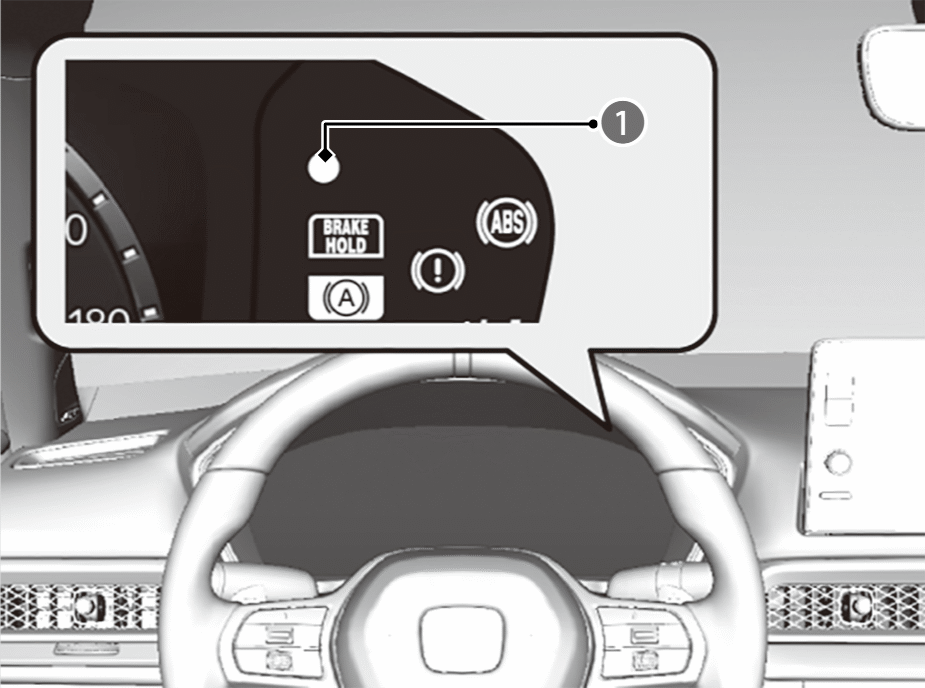

Immobilizer System Indicator
The immobilizer system indicator will blink in the instrument panel if the immobilizer system cannot recognise the key information when you have pressed the POWER button.
If the system repeatedly does not recognise the coding of your key, contact a dealer. If you have lost your key and cannot start your vehicle, contact a dealer.
Apply and hold the brake pedal before turning the vehicle on the first time after the 12-volt battery has been disconnected.
Security System Alarm
The security system alarm activates when the tailgate, bonnet, or doors are forcibly opened. The alarm does not activate if the tailgate or doors are opened with the remote transmitter or keyless access system.
Unlock the vehicle using the remote transmitter or keyless access system, or turn the power mode to ON. The system, along with the horn and flashing lights, is deactivated.
Setting the security system alarm
The security system alarm automatically sets when the following conditions have been met:
- The power mode is set to VEHICLE OFF.
- The bonnet is closed.
- All doors and the tailgate are locked from outside with the remote transmitter, or keyless access system.
When the security system alarm sets
The security system alarm indicator in the instrument panel blinks and the blinking interval changes after about 15 seconds.
To cancel the security system alarm
The security system alarm is cancelled when the vehicle is unlocked using the remote transmitter or keyless access system, or when the power mode is set to ON. The security system alarm indicator goes off at the same time.
The security system alarm will continue for approximately 5 minutes before the security system deactivates.
The system will go through ten 30-second cycles, during which the horn will sound and an emergency indicator will flash.
Depending on circumstances, the security system may continue operating for more than 5 minutes.
Do not set the security system alarm when someone is in the vehicle or a window is open. The system can accidentally activate when:
- Unlocking the door with the lock tab.
- Opening the bonnet with the bonnet release handle.
If the 12-volt battery goes dead after you have set the security system alarm, the security alarm may sound once the 12-volt battery is recharged or replaced.
If this occurs, deactivate the security system alarm by unlocking a door using the remote transmitter or keyless access system.
Do not alter the system or add other devices to it. Doing so may damage the system and make your vehicle inoperable.
The system may accidentally activate such as when:
- The vehicle is parked in an automated garage.
- The vehicle is being washed with highly pressurized water or being put through an automated car wash.
- The vehicle is being transported by train, ferry or trailer.
- The vehicle is subjected to heavy rain or stormy weather.
- Ice is being removed from the vehicle.
You can use ultrasonic/ tilt sensor OFF button not to accidentally activate the security system alarm.
If you unlock a door with the built-in key while the security system is activated, the alarm will sound.
Ultrasonic Sensors*
The ultrasonic sensors activate only when the security system alarm is set. If the sensors detect an intruder moving around inside or entering the interior of the vehicle through a window, the sensor will activate the alarm.
Whether the ultrasonic sensors has been activated or not, the security system can only be turned off by the remote transmitter, not the key.
It is possible to confirm whether the vehicle security system was activated without your knowledge. If the security system has been activated, the ultrasonic/ tilt sensor OFF button indicator will blink for 5 minutes after you unlock the door and disable the system.
If, however, you turn the power system on, the indicator will stop blinking after 5 seconds.
If the ultrasonic sensor is malfunctioning or there is another problem, the ultrasonic/ tilt sensor OFF button indicator will come on for 5 minutes after you unlock the door and disable the system.
If, however, you turn the power system on, the indicator will shut off.
The security system may accidentally activate by ultrasonic sensors such as when:
- Someone is in the vehicle
- A window is open
- Accessories or clothes are hanging in the vehicle.
To set the security system alarm without activating the ultrasonic sensors
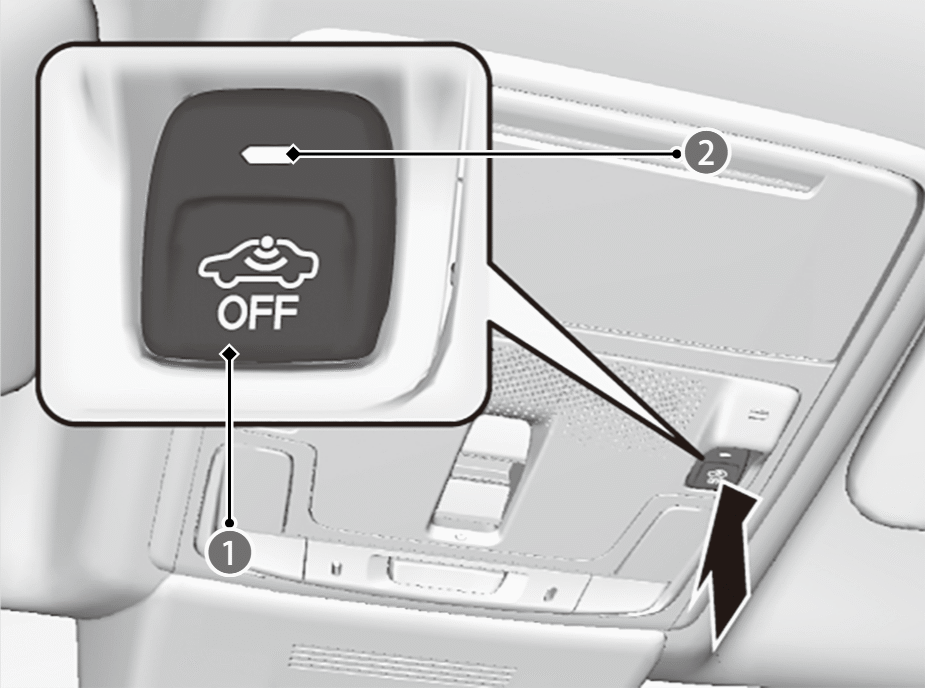
Ultrasonic/ Tilt Sensor OFF Button

Indicator
You can set the security system without activating the ultrasonic sensor. To turn off the ultrasonic sensor system, press the ultrasonic/ tilt sensor OFF button after you set the power mode to ACCESSORY or VEHICLE OFF (LOCK).
- The indicator is on in red.
To turn it on again, press the ultrasonic/ tilt sensor OFF button.
Ultrasonic sensors are turned on every time you set the security system alarm, even if you turned it off the last time.
Security System Alarm Battery Information*
Manufacturer Information:
FDK CORPORATION
Trade name: FDK
Postal address: Shibaura Crystal Shinagawa, 1-6-41 Konan, Minato-ku, Tokyo 108-8212 Japan
Handling:
Do not short-circuit, disassemble, deform, heat or incinerate. Do not place battery on metal case, metal plate or antistatic material. In case of multi cell application, replace all batteries to new at once when replacing used batteries. Do not mix the different type of batteries, the new and old batteries of the same type, or the different manufacture of the same type batteries. Do not use batteries for unspecified purposes.
Storage:
Be sure to store batteries in well-ventilated, dry and cool conditions. Keep away from water, rain, snow, frost or dew condensation. Do not store batteries near source of heat or nozzle of hot air. Do not store batteries in direct sunshine. Take care not to get wet packing by dew condensation when packing is removed from cold to warm and humid condition. Enough number of fire fighting apparatuses should be installed in warehouse. Keep batteries out of reach of children.
Note: This content is based on the law and is subject to change without notice.
Tilt Sensor*
The tilt sensor activates only when the security system alarm is set. If someone raises the vehicle in an attempt to tow the vehicle or remove the wheels etc., the sensor will activate the alarm.
Whether the tilt sensor has been activated or not, the security system can only be turned off by the remote transmitter or keyless access system, not the key.
It is possible to confirm whether the vehicle security system was activated without your knowledge. If the security system has been activated, the ultrasonic/ tilt sensor OFF button indicator will blink for 5 minutes after you unlock the door and disable the system.
If, however, you start the engine, the will stop blinking after 5 seconds.
If the tilt sensor is malfunctioning or there is another problem, the ultrasonic/ tilt sensor OFF button indicator will come on for 5 minutes after you unlock the door and disable the system.
If, however, you start the engine, the indicator will shut off.
Do not set the tilt sensor when the vehicle is lifted or jacked up.
To set the security system alarm without activating the tilt sensor
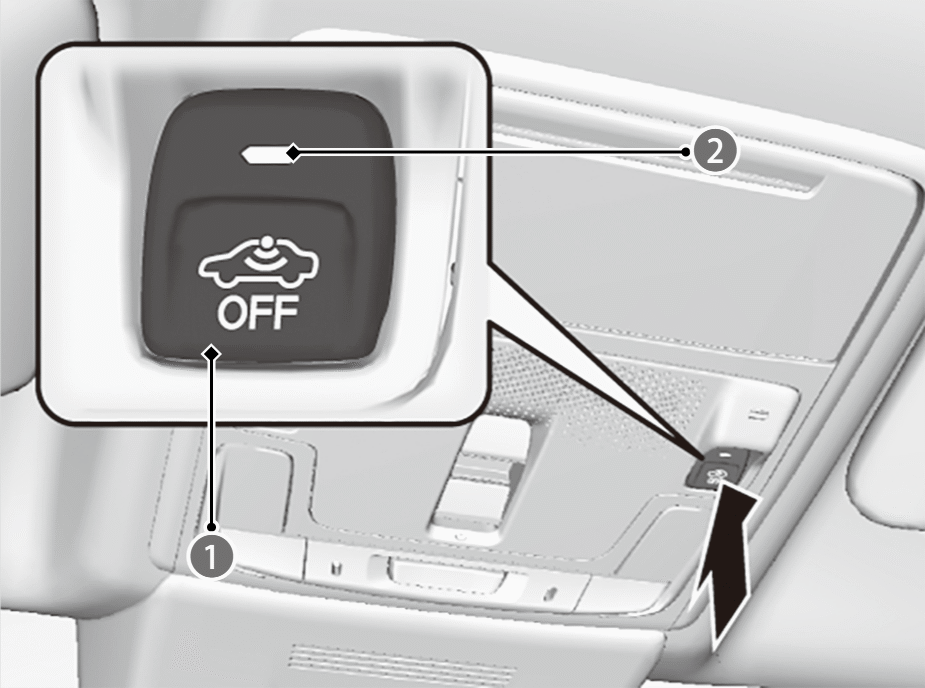
Ultrasonic/ Tilt Sensor OFF Button
Indicator
You can set the security system without activating the tilt sensor. To turn off the tilt sensor system, press the ultrasonic/ tilt sensor OFF button after you set the power mode to ACCESSORY or VEHICLE OFF (LOCK).
- The indicator is on in red.
To turn it on again, press the ultrasonic/ tilt sensor OFF button.
Tilt sensors is turned on every time you set the security system alarm, even if you turned it off the last time.
*: Not available on all models